How We Optimized a React Native App for Large Survey Lists
See how we optimized a React Native survey application with 100+ questions to improve scrolling performance and responsiveness during user interaction.
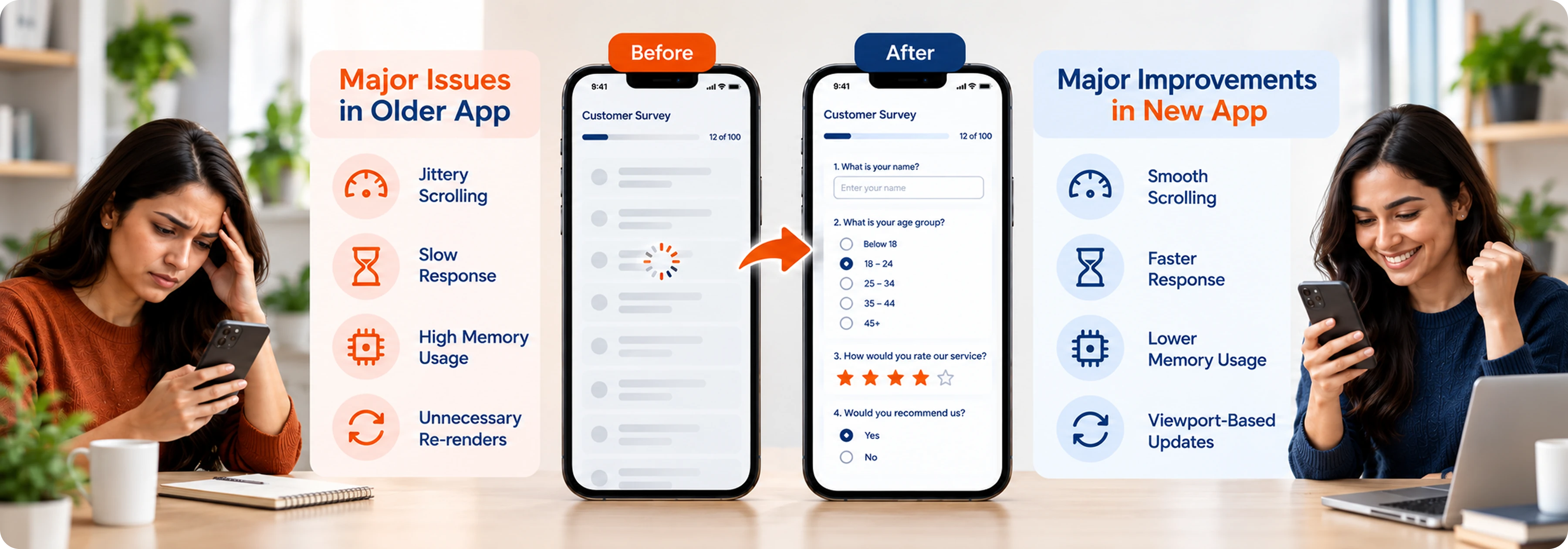
Overview
The application was built to support surveys with 100+ questions through an interactive SectionList. It includes multiple-choice questions with single- and multi-select options, dynamic text inputs, and real-time validation and feedback.
As the number of questions increased, scrolling and user interaction became progressively less responsive. We focused on improving rendering efficiency and reducing unnecessary updates to create a more responsive survey experience.
Customer
A business looking to optimize a React Native application that struggled with performance when handling surveys with 100+ questions. The goal was to improve scrolling responsiveness and reduce unnecessary rendering and update operations.

Challenges

Performance degradation in large survey lists: The application performed smoothly for the first 20–30 questions, but scrolling jitter became increasingly noticeable as the survey grew. Beyond 50 questions, scrolling and user interaction became significantly less responsive.
Frequent component state updates: Survey interactions involved multiple-choice selections, dynamic text inputs, and real-time validation, resulting in frequent state updates that increased the rendering workload across the list.
Unnecessary component rendering: Updating individual survey answers triggered avoidable re-renders and repeated calculations, creating additional overhead that affected responsiveness during scrolling and interaction.
Expensive updates across rendered items: Although SectionList already virtualized visible content, rendered components could still perform unnecessary expensive update operations. The application needed a way to limit this work based on the items currently visible in the viewport.
Solution
Our team optimized the React Native survey application by addressing the rendering and update overhead affecting its SectionList. Instead of relying only on existing list virtualization, our team worked on viewport optimizations to reduce unnecessary work.
The solution focused on improving how survey components render and update as users interact with individual questions. By reducing unnecessary re-renders, limiting expensive operations to visible items, and leveraging the New Architecture, we improved responsiveness for surveys containing 100+ questions.
Major Features
Component-Level Optimization
React.memo, useMemo, and stable callbacks were used to reduce unnecessary component re-renders and expensive calculations when individual survey answers were updated.
Viewport-Aware Updates
The application tracks the items currently visible in the viewport and limits expensive updates and computations to those items during scrolling and interaction.
SectionList Virtualization
The existing SectionList virtualization controls which survey items are rendered, reducing the amount of content actively handled by the application.
Two-Layer Optimization
SectionList virtualization manages which items are rendered, while viewport-aware updates control which rendered items perform expensive update operations. Together, these layers improve responsiveness across large surveys.
Technology Stack

Tools & Technology

Architecture & Performance
Business Outcome
The optimization improved the responsiveness of the survey application as the number of questions increased. By reducing unnecessary rendering and limiting expensive operations to visible items, the application became better suited for surveys containing 100+ questions.

Improved Scrolling Performance
The application experienced better responsiveness when scrolling through surveys with a large number of questions.

Reduced Unnecessary Rendering
React.memo, useMemo, and stable callbacks reduced unnecessary component re-renders and expensive calculations during answer updates.

More Efficient Viewport Updates
Expensive updates and computations were limited to items currently visible in the viewport, reducing unnecessary JavaScript and component work.

Improved Large-List Responsiveness
The combination of SectionList virtualization and viewport-aware updates created two optimization layers that improved responsiveness during scrolling and interaction.

More Efficient Architecture
Migrating to React Native's New Architecture reduced reliance on the legacy bridge and improved the efficiency of communication between JavaScript and native components.
Our Philosophy, Proven in Practice
Consulting Before Coding
The performance issues became more noticeable as the number of survey questions increased. Instead of optimizing individual components without understanding the root cause, we used profiling to identify increasing component complexity, frequent state updates, and unnecessary rendering as key contributors.
Optimize the Work, Not Just the List
The main bottleneck was not simply the number of questions. Frequent state updates and unnecessary rendering created cumulative overhead as the survey grew. Our approach focused on reducing this overhead through component-level and viewport-aware optimizations.

We don't treat large lists as the problem before understanding what makes them slow.